VLANs
All ports are part of one VLAN-aware bridge. The switch works in one of two VLAN modes:
| Mode | How ports are grouped | Use it for |
|---|---|---|
802.1Q (DOT1Q, default) |
IEEE 802.1Q: declared VLANs, access and trunk ports, tagged frames between switches. | Almost everything. |
Port-based (PORT_BASED) |
Disjoint groups of ports, no tags at all. A port only talks to ports of its own group. | Splitting one switch into several separate small switches. |
By factory default the switch is in 802.1Q mode, VLAN 1 (named default)
is declared, and every port is an access port in VLAN 1.
802.1Q VLANs
- Declared VLANs. Every VLAN a port or routed VLAN interface uses must be declared first, with an id (1 … 4094) and an optional name. Routed VLAN interfaces can refer to a VLAN by its name.
- Access port. Belongs to exactly one VLAN and sends and receives its frames untagged. This is how end devices (PCs, printers, access points without VLAN support) are connected.
- Trunk port. Carries several VLANs, usually to another switch or a
router: the native VLAN untagged (optional), and the trunk VLANs
tagged. Trunk VLANs are single ids and ranges. A range stands for the
declared VLANs inside it:
30..40carries VLAN 30, and any VLAN from 31 to 40 that is declared later. A trunk with no trunk VLANs at all carries every declared VLAN. - Suspended VLAN. Stays configured, but no port carries it. That is a quick way to cut a VLAN off without losing its port assignments.
- Deleting a VLAN needs every port and routed VLAN interface moved away from it first.
Port-based VLANs
Each port belongs to exactly one group and forwards only to ports of the same group. There are no tags and no trunks. The switch behaves like several independent unmanaged switches.
Each group has an id (1 … 4094), an optional name and its member ports. The id is also the VLAN id used inside the switch, so a routed VLAN interface refers to a group by its id or name, like to a VLAN.
Switching the VLAN mode
The two modes do not mix: in port-based mode there are no declared VLANs
and no access or trunk settings on the ports, and in 802.1Q mode there are
no groups. Switching therefore changes the VLAN settings of every port at
once. Group 1 and VLAN 1 have the same id, so a management interface on
vlan1 keeps working across the switch. A routed VLAN interface that
refers to a group or VLAN by name needs one with that name on the
other side, or a change to the id.
Rules
| Rule | Error when broken |
|---|---|
| VLANs used by ports and routed VLAN interfaces are declared (802.1Q mode). | VLAN 20 is not declared in vlans |
| In 802.1Q mode, every port in the configuration has access or trunk settings. | ethernet/switched-vlan/config is required: interface-mode ACCESS with an access-vlan, or TRUNK |
| In port-based mode, every port in the configuration is in exactly one group. | interface lan4: not a member of any port-based-vlans group |
| An access VLAN only in access mode. | WHEN condition failed, xpath is ../interface-mode = 'ACCESS' |
| No configuration of the other VLAN mode. | vlans requires switch vlan-mode DOT1Q; in PORT_BASED mode use port-based-vlans |
A port you want to leave unused can be removed from the configuration entirely. It is then switched off.
Web UI
The VLANs card of the status page
shows, in 802.1Q mode, the declared VLANs with name, status (UP for
active, SUSPENDED) and the ports that carry them. In port-based mode it
shows the groups with their names and member ports. The VLAN column of
the Ports card shows each port's VLANs: access 20,
trunk: native 1, 20, 30..40, or group 1 (office).
What you can change:
- VLANs card, 802.1Q mode: add, rename, suspend and delete VLANs.
- VLANs card, port-based mode: add, edit and delete groups. Ticking a port that is in another group moves it.
- VLAN mode switches between 802.1Q and port-based mode. In port-based mode all ports go into group 1; in 802.1Q mode every port becomes an access port in VLAN 1. The switch refuses the change while a routed VLAN interface uses another VLAN or group.
- Ports card, a port's Edit (802.1Q mode): Access (untagged in one
VLAN) or Trunk (a native VLAN and the tagged VLANs, such as
10, 20-30; empty means all declared VLANs).
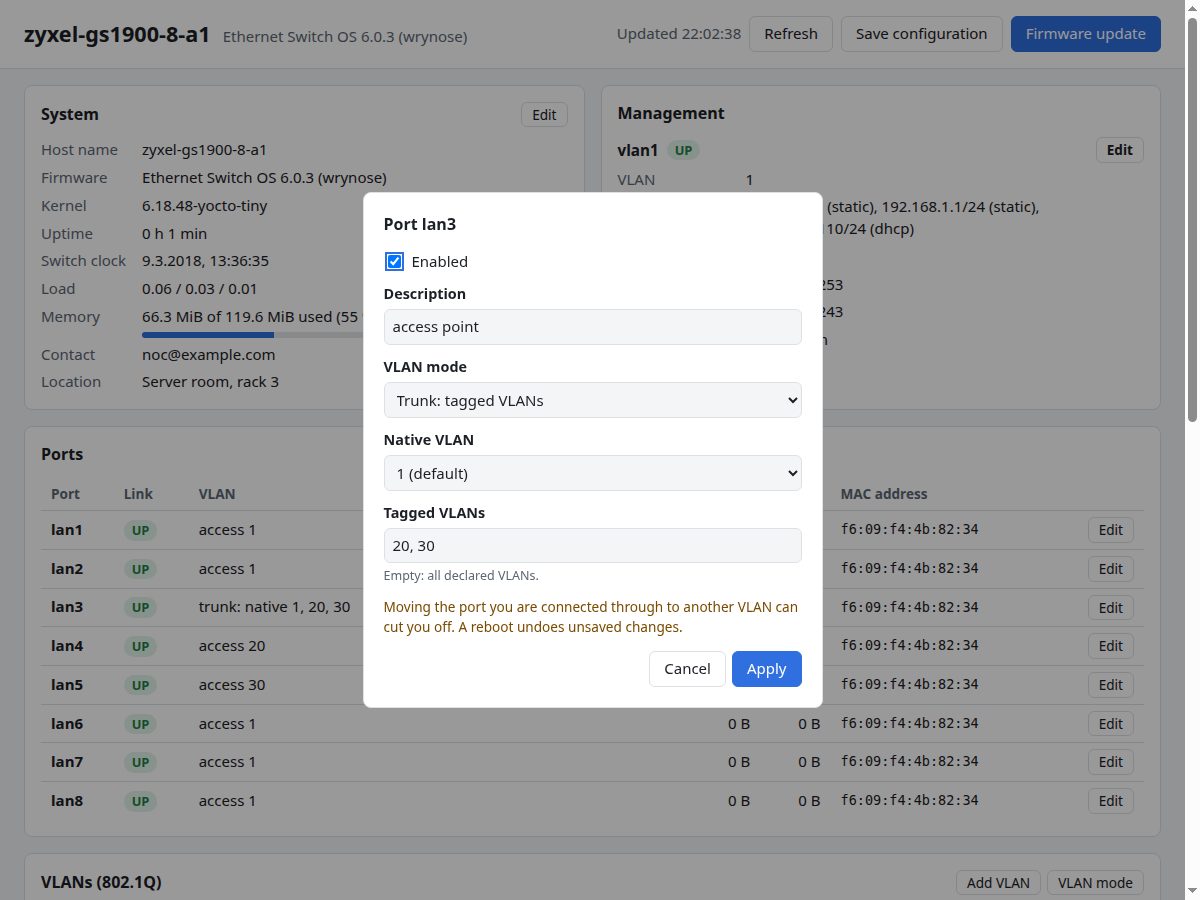
Moving the port your computer is connected to into another VLAN or group cuts you off. Reboot the switch to go back to the saved configuration.
CLI
Known problem
In the current firmware the CLI on the switch rejects VLAN ids (Number 20 out of range: 1 - 4094). Until this is fixed, set VLANs over RESTCONF, see Known problems.
Declare a VLAN
switch> set vlans vlan 20 config vlan-id 20
switch> set vlans vlan 20 config name office
switch> set vlans vlan 30 config vlan-id 30
switch> set vlans vlan 30 config name lab
switch> commit
The id appears twice, as list key and as value, and both must be the same.
If you set only name or status of a VLAN without its vlan-id, the
commit fails with data-missing ... instance-required : ../config/vlan-id.
Using a VLAN that is not declared fails:
validate: interface lan3: VLAN 20 is not declared in vlans
Access port
Move lan3 into VLAN 20:
switch> set interfaces interface lan3 ethernet switched-vlan config access-vlan 20
switch> commit
switch> save
Trunk port
Turn lan8 into a trunk with VLAN 1 untagged and VLANs 20 and 30 … 40
tagged:
switch> delete interfaces interface lan8 ethernet switched-vlan config access-vlan 1
switch> set interfaces interface lan8 ethernet switched-vlan config interface-mode TRUNK
switch> set interfaces interface lan8 ethernet switched-vlan config native-vlan 1
switch> set interfaces interface lan8 ethernet switched-vlan config trunk-vlans 20
switch> set interfaces interface lan8 ethernet switched-vlan config trunk-vlans 30..40
switch> commit
Delete the access VLAN first
access-vlan is only allowed in access mode. If you change the mode but
leave it in place, the commit fails with
WHEN condition failed, xpath is ../interface-mode = 'ACCESS'. Delete
it with its current value, as in the first line above. The mode has no
default, so always set interface-mode too.
trunk-vlans takes single ids and ranges written x..y. Give it once per
entry.
Remove one VLAN from a trunk:
switch> delete interfaces interface lan8 ethernet switched-vlan config trunk-vlans 20
switch> commit
Turn a trunk back into an access port by deleting its switched-VLAN settings and setting new ones:
switch> delete interfaces interface lan8 ethernet switched-vlan
switch> set interfaces interface lan8 ethernet switched-vlan config interface-mode ACCESS
switch> set interfaces interface lan8 ethernet switched-vlan config access-vlan 1
switch> commit
Suspend a VLAN
switch> set vlans vlan 30 config status SUSPENDED
switch> commit
set vlans vlan 30 config status ACTIVE brings it back.
Delete a VLAN
switch> delete vlans vlan 20
switch> commit
While something still uses it, the commit lists every user:
validate: interface lan3: VLAN 20 is not declared in vlans; interface lan8: VLAN 20 is not declared in vlans; interface vlan20: routed-vlan vlan "office": no VLAN has this name
Check
switch> show configuration cli vlans
switch> show configuration cli interfaces interface lan8 ethernet
ethernet switched-vlan config interface-mode TRUNK
ethernet switched-vlan config native-vlan 1
ethernet switched-vlan config trunk-vlans 20
ethernet switched-vlan config trunk-vlans 30..40
show state json vlans shows each VLAN with its status in effect and the
ports that carry it (members). The text format (show state text vlans)
leaves the member ports out.
Switch to port-based mode
In port-based mode, vlans and the ports' switched-vlan settings must be
absent. So the whole change has to be made in the candidate and committed
at once.
Example: lan1 … lan4 become group 1 "office", lan5 … lan8 group 2
"lab". The management interface vlan1 stays on group 1:
switch> delete vlans
switch> delete interfaces interface lan1 ethernet switched-vlan
switch> delete interfaces interface lan2 ethernet switched-vlan
switch> delete interfaces interface lan3 ethernet switched-vlan
switch> delete interfaces interface lan4 ethernet switched-vlan
switch> delete interfaces interface lan5 ethernet switched-vlan
switch> delete interfaces interface lan6 ethernet switched-vlan
switch> delete interfaces interface lan7 ethernet switched-vlan
switch> delete interfaces interface lan8 ethernet switched-vlan
switch> set switch config vlan-mode PORT_BASED
switch> set port-based-vlans group 1 config id 1
switch> set port-based-vlans group 1 config name office
switch> set port-based-vlans group 1 config port lan1
switch> set port-based-vlans group 1 config port lan2
switch> set port-based-vlans group 1 config port lan3
switch> set port-based-vlans group 1 config port lan4
switch> set port-based-vlans group 2 config id 2
switch> set port-based-vlans group 2 config name lab
switch> set port-based-vlans group 2 config port lan5
switch> set port-based-vlans group 2 config port lan6
switch> set port-based-vlans group 2 config port lan7
switch> set port-based-vlans group 2 config port lan8
switch> commit
switch> save
The management address is now only reachable from lan1 … lan4.
Move a port to another group
switch> delete port-based-vlans group 1 config port lan4
switch> set port-based-vlans group 2 config port lan4
switch> commit
Back to 802.1Q
The same way in reverse, in one commit: delete port-based-vlans, set the
mode, declare the VLANs and give every port its switched-vlan settings.
Back to the factory layout, with all ports in VLAN 1:
switch> delete port-based-vlans
switch> set switch config vlan-mode DOT1Q
switch> set vlans vlan 1 config vlan-id 1
switch> set interfaces interface lan1 ethernet switched-vlan config interface-mode ACCESS
switch> set interfaces interface lan1 ethernet switched-vlan config access-vlan 1
(the same two lines for lan2 … lan8)
switch> commit
RESTCONF
Coming later
Examples are not written yet. See Using RESTCONF for how the CLI paths above map to RESTCONF resources.
VLANs are configured under:
/restconf/data/clixon-switch:vlans
/restconf/data/clixon-switch:switch
/restconf/data/clixon-switch:port-based-vlans
/restconf/data/openconfig-interfaces:interfaces/interface=lan3/openconfig-if-ethernet:ethernet/openconfig-vlan:switched-vlan